How to install Apache worker + PHP FastCGI and PHP-FPM on Ubuntu 12.04 LTS
 Apache worker suits web servers that must handle heavy loads with limited resources, because it uses less memory than Prefork mode.
Setting up Apache worker with PHP is more involved than with Prefork because Apache worker does not support the PHP module. PHP FastCGI and PHP-FPM must be installed instead.
Apache worker suits web servers that must handle heavy loads with limited resources, because it uses less memory than Prefork mode.
Setting up Apache worker with PHP is more involved than with Prefork because Apache worker does not support the PHP module. PHP FastCGI and PHP-FPM must be installed instead.
Installing Apache worker + PHP FastCGI + PHP-FPM on Ubuntu 12.04 LTS
-
Log in as root with this command.
$ sudo su - -
Ubuntu keeps the PHP FastCGI package in the multiverse repository, so add multiverse to /etc/apt/sources.list.
root@Ezylinux:~# vi /etc/apt/sources.listAdd the following lines.deb http://us.archive.ubuntu.com/ubuntu/ precise multiverse deb-src http://us.archive.ubuntu.com/ubuntu/ precise multiverse deb http://us.archive.ubuntu.com/ubuntu/ precise-updates multiverse deb-src http://us.archive.ubuntu.com/ubuntu/ precise-updates multiverse -
After editing /etc/apt/sources.list, install Apache worker, PHP FastCGI, and PHP FPM with this command.
root@Ezylinux:~# apt-get install apache2-mpm-worker libapache2-mod-fastcgi php5-fpm php5 -
Configure PHP FPM to listen on TCP port 9000.
root@Ezylinux:~# vi /etc/php5/fpm/pool.d/www.confAdd the following setting.listen = 127.0.0.1:9000 -
Enable the fastcgi and alias modules with this command.
root@Ezylinux:~# a2enmod actions fastcgi aliasAdd the following settings to /etc/apache2/apache2.conf.<IfModule mod_fastcgi.c> AddHandler php5-fcgi .php Action php5-fcgi /php5-fcgi Alias /php5-fcgi /usr/lib/cgi-bin/php FastCgiExternalServer /usr/lib/cgi-bin/php -host 127.0.0.1:9000 -pass-header Authorization </IfModule> -
Install additional PHP modules.
root@Ezylinux:~# apt-get install php5-mysql php5-curl php5-gd php5-intl php-pear php5-imagick php5-imap php5-mcrypt php5-memcache php5-ming php5-ps php5-pspell php5-recode php5-snmp php5-sqlite php5-tidy php5-xmlrpc php5-xsl -
Start the PHP-FPM service with this command.
root@Ezylinux:~# service php-fpm start -
Start the Apache service with this command.
root@Ezylinux:~# service apache2 start
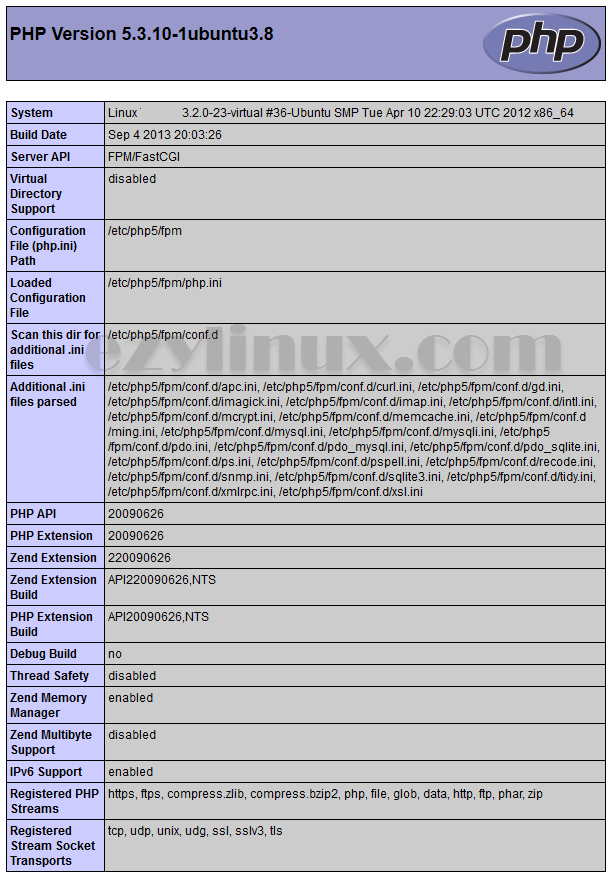
Testing the Apache worker and PHP-PFM installation
- Create a phpinfo file at /var/www/info.php.
root@Ezylinux:~# vi /var/www/info.php - Add the phpinfo function as shown.
<?php phpinfo(); ?> - Open http://YOURIP/info.php in a browser to test it (YOURIP is the web server’s IP address).