Assigning retention policies to email folders
Zimbra users can configure the removal of email that has stayed in their mailbox too long, similar to removing mail from Trash (normally after more than 30 days). This is convenient for users who receive mail and want to keep it for a while: they no longer need to keep deleting it manually, and it helps prevent the mailbox from growing larger than necessary. You can specify how long to keep messages for each folder, providing considerable flexibility. Configuring automatic email deletion after a specified period
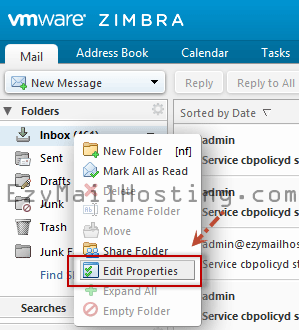
- Right-click the folder you want to configure and select Edit Properties.
- Select Retention.
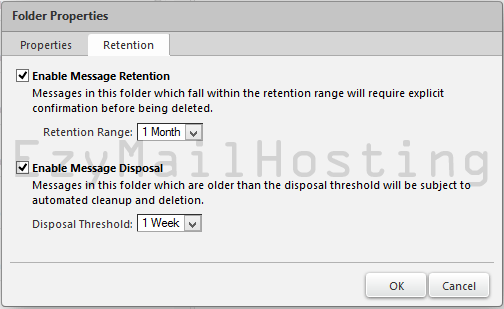
- Select Enable Message Retention and a retention period to receive a warning when attempting to delete email that is still within that period.
- Select Enable Message Disposal and a period to delete mail from the system once that period has elapsed.