Disable NGINX AIO or SSI for CVE-2026-97205 and verify the mitigation
If NGINX uses AIO together with SSI, you can disable either feature to reduce exposure to CVE-2026-97205 while arranging a package update. If the site still needs SSI to assemble pages, consider disabling AIO. If it does not need SSI, disabling SSI is another option.
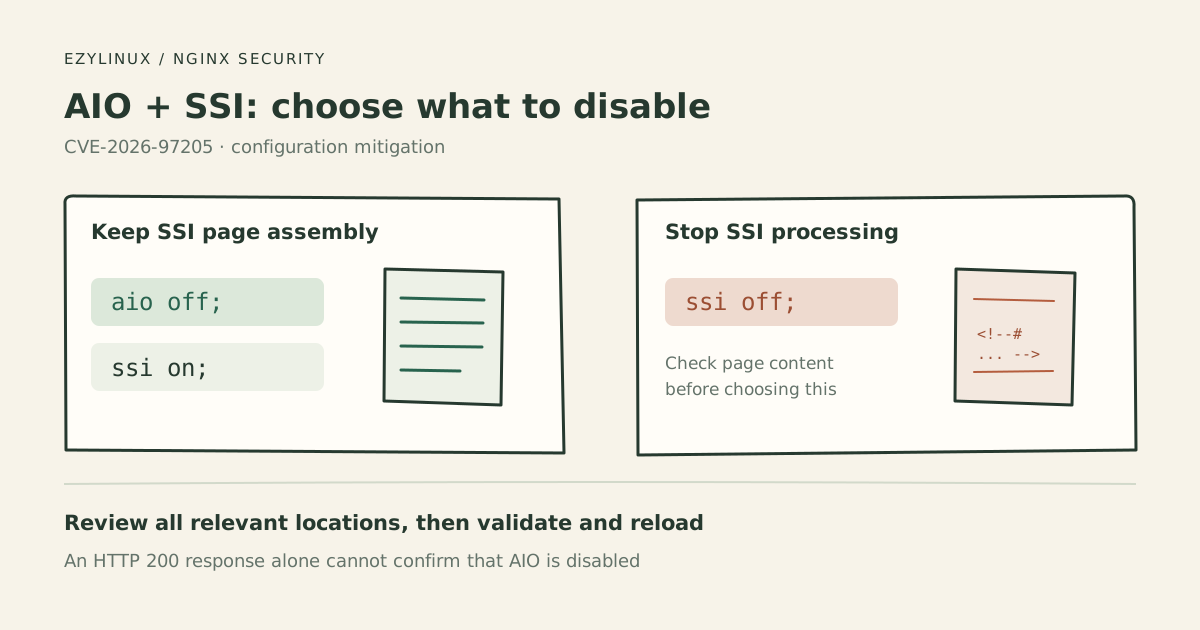
Information checked on 28 October 2026. The image is a diagram. Test results below are expected criteria, not measurements from the author’s server.
What the vulnerability involves
CVE-2026-97205 is a use-after-free: code accesses memory after it has been released. It can occur in certain configurations using asynchronous file I/O, or AIO, with Server Side Includes, or SSI, pages containing include virtual commands.
A remote attacker may cause worker crashes or memory corruption. Code execution may be possible if ASLR is disabled or bypassed. Red Hat’s advisory lists disabling AIO or SSI as mitigations.
This example assumes NGINX on Linux managed by systemd. For a container deployment, inspect and reload the configuration inside the container actually serving requests.
Check whether the relevant features are enabled
Check the version and dump the configuration, including included files:
nginx -v
sudo nginx -T
Look for AIO settings such as:
aio on;or:
aio threads;Also look for:
ssi on;Read the surrounding http, server and location blocks and relevant subrequest paths. Finding aio and ssi in unrelated parts of the files is insufficient to establish an affected request path. Do not assume that switching to aio threads avoids the vulnerability.
The defaults are aio off; and ssi off;, but included files or child locations can enable them. See the AIO reference and SSI reference.
Option 1: disable AIO and keep SSI
If the site uses SSI to include headers, footers or content from another URL, consider disabling AIO so page assembly can continue. Back up the file first, then replace relevant aio on; or aio threads; settings with:
aio off;For example, an existing location:
location /pages/ {
    root /var/www/site;
    aio threads;
    ssi on;
}
After the change:
location /pages/ {
    root /var/www/site;
    aio off;
    ssi on;
}
This illustrates the setting to change. Retain your actual root, alias, authentication and other site settings. Also review locations reached by SSI include virtual subrequests.
If setting aio off; at the http level, check for server or location overrides that re-enable AIO. Disabling AIO changes file I/O behavior, so check response times and resource use under representative load, especially for large-file workloads. See the AIO documentation.
Option 2: disable SSI if the site does not need it
Change the sections enabling SSI to:
ssi off;Review every location, including if blocks inside locations if they contain ssi on;. Edit the existing directive rather than adding a duplicate ssi off; in the same scope.
NGINX will stop processing SSI commands in responses. Pages relying on SSI may lose content, and directives or paths in HTML comments may be delivered literally to clients. Review the actual pages before choosing this option. See the behavior described in the SSI module documentation.
Choose the option that fits the application; the advisory does not require disabling both features together.
Validate and reload
Check the configuration syntax:
sudo nginx -tOnly after it passes, reload and inspect status. Run these commands individually and stop to investigate any error:
sudo systemctl reload nginx
sudo systemctl status nginx --no-pager
sudo journalctl -u nginx --since "5 minutes ago" --no-pager
Read the NGINX error log too. An active service does not prove it loaded the new configuration. Check for errors applying it and confirm old workers have finished draining, as described in the reload documentation.
Test the AIO mitigation
Inspect nginx -T again. Read scopes and included files to confirm AIO is not enabled on relevant paths. Check reload success, then test real SSI pages and files the site serves.
sudo nginx -TWith AIO disabled and SSI retained, pages should still assemble normally. However, curl does not report whether NGINX used AIO. An HTTP 200 is an application check; configuration review and reload evidence are also needed.
nginx -T reads files on disk rather than resolved settings from a worker’s memory. The NGINX command-line documentation explains its scope. Do not use that output alone to claim the running process changed.
Test the SSI mitigation
In staging, place an HTML file under the existing location being checked. Do not create a new location with different SSI settings, and do not enable SSI on production just to obtain a baseline.
Create ssi-check.html under the document root so its URL is /ssi-check.html:
BEGIN
<!--# include virtual="/ssi-fragment.txt" -->
END
Create ssi-fragment.txt so it is available at /ssi-fragment.txt:
SSI_INCLUDE_OKThis is an ordinary SSI behavior check, not an exploit payload. The include virtual syntax comes from the NGINX SSI reference.
Use curl to reach the origin directly. Replace the domain and IP with your own. If the location uses a URL prefix, adjust both the requested URL and the fragment path accordingly.
curl --noproxy '*' \
  --resolve example.com:443:203.0.113.10 \
  --max-time 10 -i \
  https://example.com/ssi-check.html
Check that this is the intended file, that Content-Type is text/html and that the response is not cached. Compare the body; the following are expected examples.
Before the change, with SSI processing:
BEGIN
SSI_INCLUDE_OK
END
After setting ssi off;:
BEGIN
<!--# include virtual="/ssi-fragment.txt" -->
END
If you instead set aio off; and retain ssi on;, the included content should still appear. This test checks SSI processing; it does not detect AIO state.
Read the curl response body because a browser hides HTML comments. Check all relevant paths, remove the test files you added when finished and retest real pages. Without a baseline where SSI processed successfully, seeing a literal directive once cannot establish that the recent change caused it.
| Selected mitigation | Evidence to check |
|---|---|
| Disable AIO | Configuration covers relevant paths without enabled overrides; reload succeeded and old workers finished |
| Disable SSI | Configuration and reload evidence plus a working before/after comparison showing SSI no longer processes |
| Either option | Real site behavior remains acceptable and every instance has been checked |
Update the packages to fix the bug
NGINX upstream fixes CVE-2026-97205 in the stable branch from 1.30.6 and the mainline branch from 1.31.7, according to NGINX Security Advisories. For Ubuntu packages, compare full package versions with USN-8955-1, since fixes may be backported to an older release.
After updating, verify that the running process uses the patched binary. A configuration reload alone does not load a new executable. If using systemctl restart nginx, choose a window that can tolerate stopping and starting the service, then check logs and application behavior again. Passing the AIO or SSI checks demonstrates configuration mitigation; proving the bug is fixed also requires package and running-binary evidence.