Disable NGINX HTTP/3 for CVE-2026-95101 and verify the change
If you run NGINX as a reverse proxy with HTTP/3 enabled, you can temporarily disable HTTP/3 to reduce exposure to CVE-2026-95101 while arranging a package update. HTTPS over TCP can stay available. This article checks the configuration, disables the QUIC listeners and compares connections before and after the change.
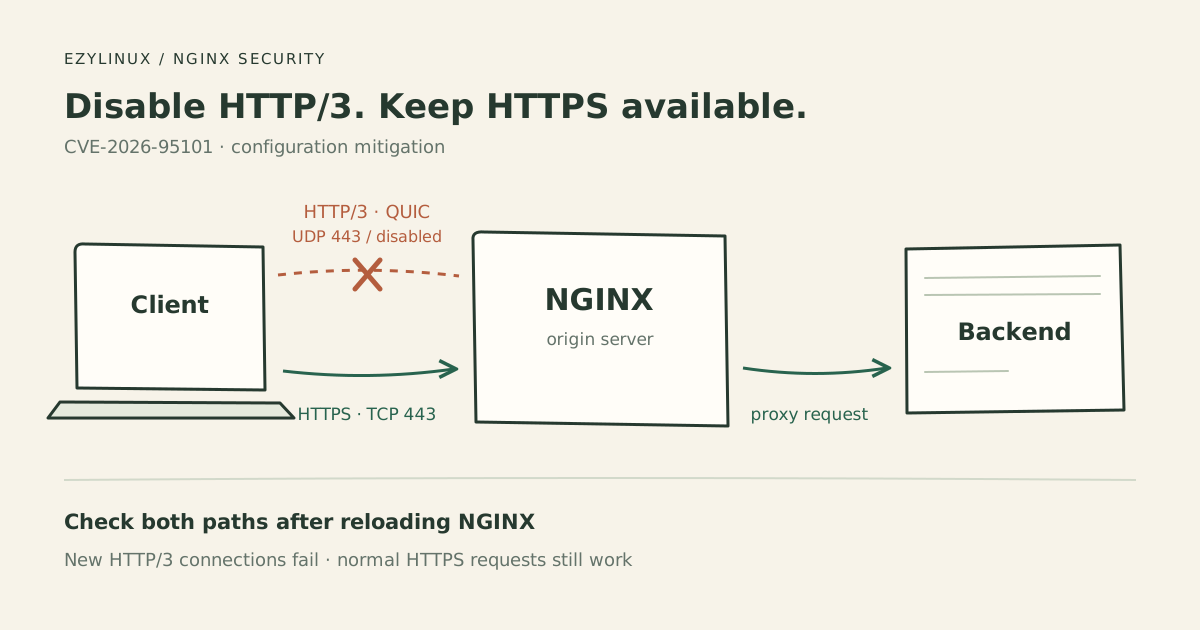
Information checked on 28 October 2026. The image is a diagram. Test results below are expected criteria, not measurements from the author’s server.
What the vulnerability involves
CVE-2026-95101 affects NGINX HTTP/3 when used with proxy_request_buffering. An unauthenticated attacker may inject data into requests forwarded to a backend. Red Hat’s advisory lists disabling HTTP/3 or setting proxy_request_buffering off; in the relevant configuration as mitigations.
This example disables HTTP/3 so its effect can be checked with connection tests. It assumes NGINX on Linux managed by systemd. For a container deployment, check and reload the NGINX configuration inside the container actually serving requests.
Check the configuration and record a baseline
Check the version and dump the configuration, including included files:
nginx -v
sudo nginx -T
Find listen directives containing quic, across every virtual host, IPv4, IPv6 and any other configured port. For example:
listen 443 quic reuseport;
listen [::]:443 quic reuseport;
Also check proxy_pass and proxy_request_buffering in the sections handling HTTP/3. Read included files such as those in conf.d or sites-enabled. nginx -T shows configuration files on disk; it does not prove the running process has loaded them. See the NGINX command-line reference.
On the test client, check that curl lists HTTP3 under Features:
curl -VConnect directly to NGINX. Replace example.com with your domain and 203.0.113.10 with the origin IP. --resolve selects an IP while retaining the domain name for TLS and virtual host selection.
curl --noproxy '*' --http3-only \
  --resolve example.com:443:203.0.113.10 \
  --max-time 10 -v \
  https://example.com/
HTTP/3 should connect before the change. If it already fails, investigate curl support, UDP firewalls and the network path first; there is no working baseline to compare. Do not enable HTTP/3 on a server where it is already disabled just to run this test.
--http3-only prevents fallback to an earlier HTTP version, as described in the curl manual. An unsupported option or missing HTTP/3 support is a client limitation, not evidence that the server has disabled HTTP/3.
Disable the QUIC listeners
Back up the configuration file you will change. Edit the existing server block. For example, before the change:
listen 443 ssl;
listen 443 quic reuseport;
listen [::]:443 quic reuseport;
After the change:
listen 443 ssl;

# listen 443 quic reuseport;
# listen [::]:443 quic reuseport;
Retain all existing HTTPS TCP listeners, including IPv6 if configured. Disable the relevant QUIC listeners across all virtual hosts. Do not just remove the word quic and leave the remaining listener options behind.
Remove Alt-Svc advertisements for h3 too, such as:
add_header Alt-Svc 'h3=":443"; ma=86400';If another proxy or the backend supplies this header, adjust it there too. Removing Alt-Svc alone does not disable the QUIC listener. The NGINX HTTP/3 documentation shows how the listener and advertisement relate.
Validate and reload
Check the configuration first:
sudo nginx -tOnly after it passes, reload and inspect status and logs. Run these commands individually and stop to investigate any error:
sudo systemctl reload nginx
sudo systemctl status nginx --no-pager
sudo journalctl -u nginx --since "5 minutes ago" --no-pager
Also read the configured NGINX error log. NGINX may keep the old configuration if it cannot apply the new one, and old workers may still drain existing work during a graceful reload. See Controlling nginx.
Test after the change
Repeat the same HTTP/3 request from the same client and network:
curl --noproxy '*' --http3-only \
  --resolve example.com:443:203.0.113.10 \
  --max-time 10 -v \
  https://example.com/
Then check HTTPS over HTTP/1.1:
curl --noproxy '*' --http1.1 \
  --resolve example.com:443:203.0.113.10 \
  --max-time 10 -v \
  https://example.com/
On the server, check UDP listeners too if the original port was 443:
sudo ss -lunp 'sport = :443'| Check | Expected after disabling HTTP/3 |
|---|---|
| New HTTP/3 connection | Fails after a successful pre-change baseline |
| HTTPS over HTTP/1.1 | Returns the site’s normal status and content |
| Configuration and UDP listeners | No targeted NGINX QUIC listener remains |
| Reload | No error applying the new configuration |
Check every server, port and IP, including IPv6 where used. Test the origin directly when a CDN is in front: the CDN may still offer HTTP/3 even though NGINX no longer does.
A timeout alone is insufficient. Compare the baseline, configuration and listeners together. These checks verify that the HTTP/3 path has been disabled; they are not an exploit test or proof that the binary itself has been patched.
If you need to keep HTTP/3
The advisory also lists the following setting for affected sections. Check all locations for overrides that turn it back on:
proxy_request_buffering off;Do not confuse this with proxy_buffering, which buffers responses. Disabling request buffering changes how request bodies reach the backend. Once the body starts being sent, the request cannot be retried on another upstream, so test uploads and backend behavior. See proxy_request_buffering.
HTTP/3 should still connect with this mitigation. An ordinary curl request therefore cannot prove the vulnerability is mitigated. Review configuration coverage, reload success and the application’s request-body behavior.
Update the packages to fix the bug
NGINX upstream fixes CVE-2026-95101 in the stable branch from 1.30.6 and the mainline branch from 1.31.7, according to NGINX Security Advisories. Update using your existing package source and check installed modules as well.
For Ubuntu packages, consult USN-8955-1. In this notice, this CVE affects Ubuntu 26.04 LTS and 26.10 packages. Do not apply upstream version ranges directly to distribution packages: a distribution can backport fixes to an older version.
After updating, verify that the running process uses the new binary. A configuration reload alone does not load a new executable. If using systemctl restart nginx, choose a window that can tolerate stopping and starting the service. Check configuration, logs and the site again before considering re-enabling HTTP/3.