Preventing thwart SSH attacks with DenyHosts
 Soon after a server connects to the Internet, people begin making repeated login attempts over SSH. If you have not disabled root login over SSH and the password is easy, be prepared for someone to gain access within a few days. I have tried this myself: I set up a test system with an easy password, and a little over a day later the logs showed that someone had logged in.
These attackers mostly use brute force: guessing repeatedly until they find the right credentials. The guesses are not entirely arbitrary. Passwords often come from dictionaries, and usernames are often personal names or system users such as bin, cyrus, nagios, and postgres.
In this article I will introduce DenyHosts as a way to defend against these brute-force attacks. It blocks attackers’ IP addresses by reading the sshd log and checking which IP addresses have reached a configured number of failed login attempts. It then blocks those IPs through TCP Wrapper by adding them to /etc/hosts.deny.
The installation instructions here cover Red Hat and CentOS. Install and configure it as follows.
Soon after a server connects to the Internet, people begin making repeated login attempts over SSH. If you have not disabled root login over SSH and the password is easy, be prepared for someone to gain access within a few days. I have tried this myself: I set up a test system with an easy password, and a little over a day later the logs showed that someone had logged in.
These attackers mostly use brute force: guessing repeatedly until they find the right credentials. The guesses are not entirely arbitrary. Passwords often come from dictionaries, and usernames are often personal names or system users such as bin, cyrus, nagios, and postgres.
In this article I will introduce DenyHosts as a way to defend against these brute-force attacks. It blocks attackers’ IP addresses by reading the sshd log and checking which IP addresses have reached a configured number of failed login attempts. It then blocks those IPs through TCP Wrapper by adding them to /etc/hosts.deny.
The installation instructions here cover Red Hat and CentOS. Install and configure it as follows.
-
Install the rpmforge repository first so that you can install using yum. Red Hat Enterprise 5 64bit
[root@Ezylinux ~]# rpm -ivh http://apt.sw.be/redhat/el5/en/x86_64/rpmforge/RPMS/rpmforge-release-0.3.6-1.el5.rf.x86_64.rpmRed Hat Enterprise 5 32bit[root@Ezylinux ~]# rpm -ivh http://apt.sw.be/redhat/el5/en/i386/rpmforge/RPMS/rpmforge-release-0.3.6-1.el5.rf.i386.rpmRed Hat Enterprise 6 64bit[root@Ezylinux ~]# rpm -ivh http://apt.sw.be/redhat/el6/en/x86_64/rpmforge/RPMS/rpmforge-release-0.5.2-2.el6.rf.x86_64.rpmRed Hat Enterprise 6 32bit[root@Ezylinux ~]# rpm -ivh http://apt.sw.be/redhat/el6/en/i386/rpmforge/RPMS/rpmforge-release-0.5.2-2.el6.rf.i686.rpm -
Once rpmforge is installed, install DenyHosts with this command.
[root@Ezylinux ~]# yum -y install denyhostsLoaded plugins: downloadonly, fastestmirror Loading mirror speeds from cached hostfile * addons: mirror.issp.co.th * atrpms: dl.atrpms.net * base: mirror.issp.co.th * extras: mirror.issp.co.th * rpmforge: fr2.rpmfind.net * updates: mirror1.ku.ac.th addons 100% |=========================| 951 B 00:00 atrpms 100% |=========================| 3.0 kB 00:00 atrpms/primary_db 100% |=========================| 1.1 MB 00:03 base 100% |=========================| 2.1 kB 00:00 extras 100% |=========================| 2.1 kB 00:00 rpmforge 100% |=========================| 1.1 kB 00:00 updates 100% |=========================| 951 B 00:00 updates/primary 100% |=========================| 622 kB 00:00 updates 1137/1137 Setting up Install Process Resolving Dependencies --> Running transaction check ---> Package denyhosts.noarch 0:2.6-3.el5.rf set to be updated --> Finished Dependency Resolution Dependencies Resolved =================================================================================== Package Arch Version Repository Size =================================================================================== Installing: denyhosts noarch 2.6-3.el5.rf rpmforge 91 k Transaction Summary =================================================================================== Install 1 Package(s) Upgrade 0 Package(s) Total download size: 91 k Downloading Packages: denyhosts-2.6-3.el5.rf.no 100% |=========================| 91 kB 00:01 Running rpm_check_debug Running Transaction Test Finished Transaction Test Transaction Test Succeeded Running Transaction Installing : denyhosts 1/1 Installed: denyhosts.noarch 0:2.6-3.el5.rf Complete! -
After installing denyhosts, you can use it immediately without making any changes. To receive reports when an IP is blocked or a suspicious login occurs, edit the denyhosts.cfg configuration file with this command.
[root@Ezylinux ~]# vi /etc/denyhosts/denyhosts.cfgSet ADMIN_EMAIL to the email address that should receive reports. Leave it blank if you do not want reports. Example configuration for Red Hat Enterprise and CentOSSECURE_LOG = /var/log/secure HOSTS_DENY = /etc/hosts.deny PURGE_DENY = 7d BLOCK_SERVICE = sshd DENY_THRESHOLD_INVALID = 3 DENY_THRESHOLD_VALID = 5 DENY_THRESHOLD_ROOT = 2 DENY_THRESHOLD_RESTRICTED = 1 WORK_DIR = /usr/share/denyhosts/data SUSPICIOUS_LOGIN_REPORT_ALLOWED_HOSTS=YES HOSTNAME_LOOKUP=YES LOCK_FILE = /var/lock/subsys/denyhosts ADMIN_EMAIL = [email protected] SMTP_HOST = localhost SMTP_PORT = 25 #SMTP_USERNAME=foo #SMTP_PASSWORD=bar SMTP_FROM = DenyHosts SMTP_SUBJECT = DenyHosts Report AGE_RESET_VALID=5d AGE_RESET_ROOT=25d AGE_RESET_RESTRICTED=25d AGE_RESET_INVALID=10d DAEMON_LOG = /var/log/denyhosts DAEMON_SLEEP = 30s DAEMON_PURGE = 1h -
After editing the configuration, use chkconfig to start the DenyHosts service at boot.
[root@Ezylinux ~]# chkconfig denyhosts on -
Start the DenyHosts service with this command.
[root@Ezylinux ~]# /etc/init.d/denyhosts start
starting DenyHosts:    /usr/bin/env python /usr/bin/denyhosts.py --daemon --config=/etc/denyhosts/denyhosts.cfg
After starting DenyHosts, check /etc/hosts.deny. It will contain sshd blocks for IP addresses that have attempted to log in. On its first run, DenyHosts reads the entire /var/log/secure file and also blocks IPs based on past attempts.
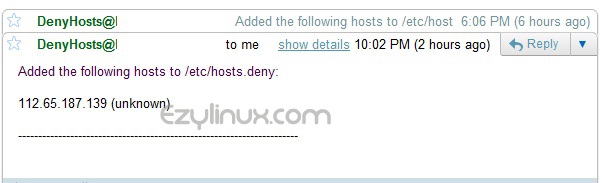
Example email report