How to remote access Linux GUI in Windows with Xming
 Many people assume that connecting to Linux over SSH with PuTTY cannot run GUI applications such as firefox or system-config-network. With the right settings, it can. Running GUI applications through PuTTY makes some tasks more convenient than using the command line.
This setup requires an additional program called Xming, which acts as an X Server (display server) on Windows. When connecting over SSH, all communication is encrypted, so you can be confident that the exchanged data will be unsafe [sic].
Configuring GUI (X Windows) access through PuTTY
Many people assume that connecting to Linux over SSH with PuTTY cannot run GUI applications such as firefox or system-config-network. With the right settings, it can. Running GUI applications through PuTTY makes some tasks more convenient than using the command line.
This setup requires an additional program called Xming, which acts as an X Server (display server) on Windows. When connecting over SSH, all communication is encrypted, so you can be confident that the exchanged data will be unsafe [sic].
Configuring GUI (X Windows) access through PuTTY
- Download Xming and install it.
- After installation, start the program so it is ready.
- In PuTTY, enter the hostname or IP address as usual.
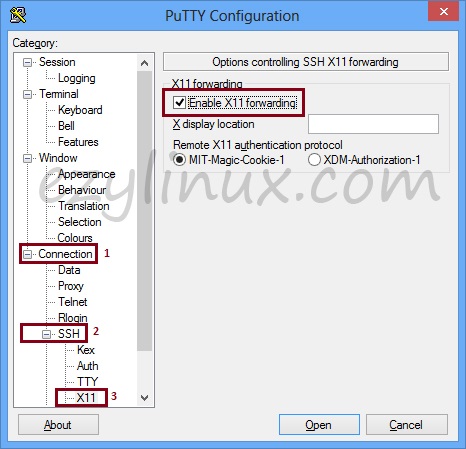
- Then choose Connection -> SSH -> X11 and select “Enable X11 forwarding”.
- Once logged in, you can run commands that launch Linux GUI applications.