How to sync your Zimbra calendar to Android phone
 Zimbra has a calendar system that supports iCalendar, also known as iCal, a file format that lets users send meeting requests by email or share them as .ics files.
iCalendar is supported by many programs, including Google Calendar, Apple Calendar, IBM Lotus Notes, Yahoo! Calendar, Evolution, eM Client, Mozilla Thunderbird, Microsoft Outlook, and Novell GroupWise.
Android users can also use iCalendar. Google Play has several programs that support it. This article introduces ICSSync, which synchronizes calendars through ics files and works well with Zimbra mail server. However, the program is free for only 20 days; after that, you must buy the unlock version.
** Customers of ezymailhosting.com can use email, calendars, and contacts on Android phones without installing any additional programs.
Installing and configuring ICSSync
Zimbra has a calendar system that supports iCalendar, also known as iCal, a file format that lets users send meeting requests by email or share them as .ics files.
iCalendar is supported by many programs, including Google Calendar, Apple Calendar, IBM Lotus Notes, Yahoo! Calendar, Evolution, eM Client, Mozilla Thunderbird, Microsoft Outlook, and Novell GroupWise.
Android users can also use iCalendar. Google Play has several programs that support it. This article introduces ICSSync, which synchronizes calendars through ics files and works well with Zimbra mail server. However, the program is free for only 20 days; after that, you must buy the unlock version.
** Customers of ezymailhosting.com can use email, calendars, and contacts on Android phones without installing any additional programs.
Installing and configuring ICSSync
- Go to Google Play -> ICSSync
- Install ICSSync.
- Open ICSSync after installation and select “Add feed”.
- On the configuration screen, enter the following:
- URL: enter the ICS file URL, or for zimbra, enter https://webmail.domain.com/home/[email protected]/Calendar
- Username: enter your username.
- Password: enter your password.
- Local calendar name: enter a calendar name.
- Select Skip certificate check (unsafe!).
- Sync interval: choose how often to synchronize data.
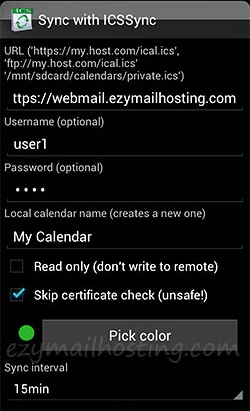
- After entering the details, press OK.
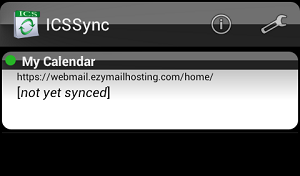
- The calendar name you configured appears, but its data has not yet been synchronized, as shown below.
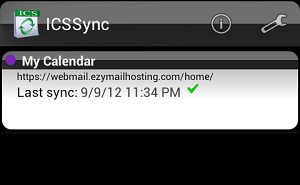
- Press “Sync all” to synchronize the data. Once synchronization finishes (shown below), you can use the calendar from the system you configured.