Installing MySQL Cluster
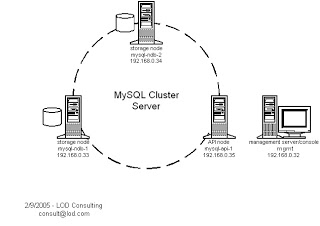 This article uses four machines: two storage nodes (mysql-ndb-1 and mysql-ndb-2), one API node (mysql-api-1), and one management node (mgmt).
Packages for installing MySQL Cluster:
This article uses four machines: two storage nodes (mysql-ndb-1 and mysql-ndb-2), one API node (mysql-api-1), and one management node (mgmt).
Packages for installing MySQL Cluster:
MySQL-clustermanagement-community.xxxx.rpm,
MySQL-clusterstorage-community.xxxx.rpm,
MySQL-clustertools-community.xxxx.rpm,
MySQL-clusterextra-community.xxxx.rpm
After installing the packages, go to mgmt, run the commands, and edit the configuration as follows:
mgmt# mkdir /var/lib/mysql-clustermgmt
mgmt# vi /var/lib/mysql-cluster/config.ini
[NDBD DEFAULT]
NoOfReplicas=2
[MYSQLD DEFAULT]
[NDB_MGMD DEFAULT]
[TCP DEFAULT]
# Management Server
[NDB_MGMD]
HostName=192.168.0.32 # IP address of this server
# Storage Nodes
[NDBD]
HostName=192.168.0.33 # IP address of storage-node-1
DataDir= /var/lib/mysql-cluster
[NDBD]
HostName=192.168.0.34 # IP address of storage-node-2
DataDir=/var/lib/mysql-cluster
# Setup node IDs for mySQL API-servers (clients of the cluster)
[MYSQLD]
[MYSQLD]
[MYSQLD]
[MYSQLD]After editing the file, run:
mgmt# ndb_mgmdCheck that ndb_mgmd is running with:
mgmt# ps -ef | grep [n]dbNext, edit /etc/my.cnf on both storage nodes using the commands below.
mysql-ndb-1# vi /etc/my.cnfmysql-ndb-2# vi /etc/my.cnfOn both storage nodes, specify the management machine by adding the same settings shown below.
[mysqld]

ndbcluster

ndb-connectstring='host=192.168.0.32' # IP address of the management server

[mysql_cluster]

ndb-connectstring='host=192.168.0.32' # IP address of the management server
mysql-ndb-1# mkdir /var/lib/mysql-cluster
mysql-ndb-1# service mysqld start
mysql-ndb-2# mkdir /var/lib/mysql-cluster
mysql-ndb-2# service mysqld startAfter starting MySQL on both storage nodes, check that all three machines are connected by running the command below. The output should be as follows:
mgmt# ndb_mgm

-- NDB Cluster -- Management Client --

ndb_mgm> show

Connected to Management Server at: localhost:1186

Cluster Configuration

---------------------

[ndbd(NDB)] 2 node(s)

id=2 @192.168.0.33 (Version: x.x.x, starting, Nodegroup: 0, Master)

id=3 @192.168.0.34 (Version: x.x.x, starting, Nodegroup: 0)

[ndb_mgmd(MGM)] 1 node(s)

id=1 @192.168.0.32 (Version: x.x.x)

[mysqld(API)] 4 node(s)

id=4 (not connected, accepting connect from any host)

id=5 (not connected, accepting connect from any host)

id=6 (not connected, accepting connect from any host)

id=7 (not connected, accepting connect from any host)
Finally, add the API node as the entry point for database access. Edit /etc/my.cnf as follows:
[mysqld]

ndbcluster

ndb-connectstring='host=192.168.0.32' # IP address of the management server

[mysql_cluster]

ndb-connectstring='host=192.168.0.32' # IP address of the management server
Then start the MySQL service with:
mysql-api-1# service mysqld startCheck the connections between all the machines:
mgmt# ndb_mgm

ndb_mgm> show

Cluster Configuration

---------------------

[ndbd(NDB)] 2 node(s)

id=2 @192.168.0.33 (Version: x.x.x, Nodegroup: 0)

id=3 @192.168.0.34 (Version: x.x.x, Nodegroup: 0, Master)

[ndb_mgmd(MGM)] 1 node(s)

id=1 @192.168.0.32 (Version: x.x.x)

[mysqld(API)] 4 node(s)

id=4 (Version: x.x.x)

id=5 (Version: x.x.x)

id=6 @192.168.0.35 (Version: x.x.x)

id=7 (not connected, accepting connect from any host)