Enable Zimbra Global Address List (GAL) to see all domains
 Zimbra has an Autocomplete feature that lists email addresses within a domain, helping users enter addresses correctly and quickly. To make autocomplete show addresses from every domain in the system, use the following procedure.
Enabling autocomplete across all domains for a specific domain
Command:
Zimbra has an Autocomplete feature that lists email addresses within a domain, helping users enter addresses correctly and quickly. To make autocomplete show addresses from every domain in the system, use the following procedure.
Enabling autocomplete across all domains for a specific domain
Command:
# su - zimbra
$ zmprov md YOURDOMAIN zimbraGalInternalSearchBase ROOT
YOURDOMAIN is the email domain. For example: To allow the domain ezymailhosting.com to autocomplete addresses from every domain in the system, run:
[[email protected] ~]$ zmprov md ezymailhosting.com zimbraGalInternalSearchBase ROOTCheck the configuration for autocomplete across all domains in the system:
[[email protected] ~]$ zmprov md ezymailhosting.com |grep zimbraGalInternalSearchBaseIf the result is: zimbraGalInternalSearchBase: DOMAIN Autocomplete shows addresses only within the domain. zimbraGalInternalSearchBase: ROOT Autocomplete shows addresses from every domain in the system. Enabling autocomplete across all domains for every domain in the system To make every domain in the system autocomplete addresses from all domains, run:
[[email protected] ~]$ zmprov mcf zimbraGalInternalSearchBase ROOTCheck the setting that allows every domain to autocomplete addresses from all domains:
[[email protected] ~]$ zmprov gcf zimbraGalInternalSearchBase
zimbraGalInternalSearchBase: ROOT
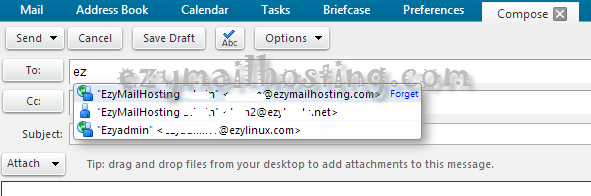
An example of autocomplete across all domains: