How to install Linux USB drives using UNetBootin tool
UNetbootin lets users create a Linux Live USB on a flash drive from an existing ISO file or one it downloads from the Internet. It supports the following Linux distributions:
| - Ubuntu(and official derivatives) - 8.04 LTS - 9.10 - 10.04 LTS - 10.10 - 11.04 - Daily CD Images - Debian - Stable/Squeeze - Testing/Wheezy - Unstable/Sid - Linux Mint - 7 - 8 - 9 - 10 - openSUSE - 10.2 - 10.3 - 11.0 - 11.1 - Factory - Arch Linux - 2010.05 - Damn Small Linux - 4.4 - SliTaz - Stable - Cooking | - gNewSense - deltah-2.1 - FreeBSD - 6.3 - 7.0 - 7.2 - 8.0 - NetBSD - 4.0 - Fedora - 10 - 11 - 12 - 13 - 14 - Rawhide - PCLinuxOS - 2010 - Sabayon Linux - 5.1 - 5.2 - Gentoo - 2007.0 - 2008.0 - Puppy Linux - 4.00 | - MEPIS - SimplyMEPIS 8 - AntiX 8 - Zenwalk - 5.2 - Slax - 6 - Dreamlinux - 3.2 - Elive - Development - CentOS - 4 - 5 - Mandriva - 2007.1 - 2008.0 - 2008.1 - LinuxConsole - 1.0.2009 - Frugalware Linux - Stable - Testing - Current - xPUD - 0.9.2 |
UNetbootin supports Windows, Linux, and Mac OSX. Download the Windows version here. On Ubuntu, run the following commands to install it directly.
[root@ezylinux ~]# sudo add-apt-repository ppa:gezakovacs/ppa
[root@ezylinux ~]# sudo apt-get update
[root@ezylinux ~]# sudo apt-get install unetbootin
To create a Linux USB drive, follow these steps:
- The USB flash drive must be at least 1GB. Format the USB drive first.
- Run unetbootin. The following window appears.
- To have the program download files from the Internet, select distribution and choose the Linux distribution and version you want.
- To create a Linux USB from an existing ISO, select Diskimage and browse to the ISO file.
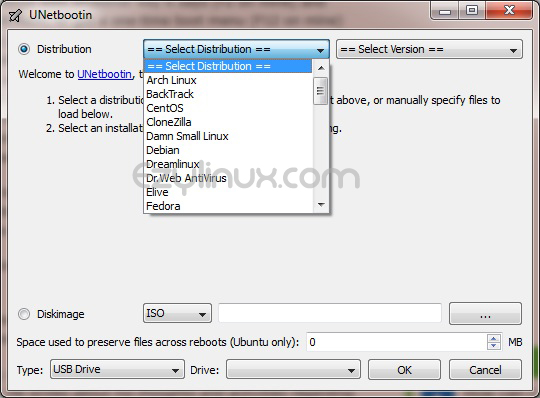
- Under Type (at the bottom), select USB drive and choose the drive on which to create the Linux USB.
- Click OK and wait until it finishes, as shown.
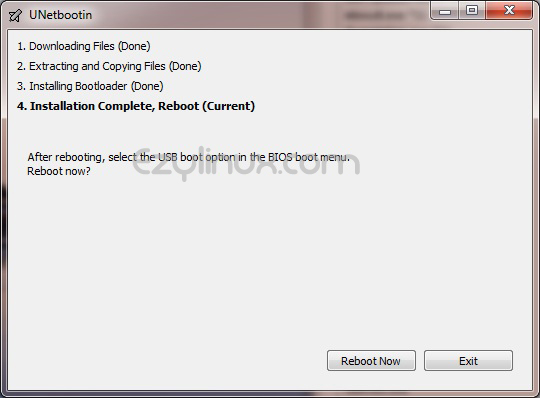
- To install on the current computer, click reboot. To use the drive on another computer, select exit.

