How to set Out of Office auto-reply message in Zimbra Webmail
 Zimbra Webmail has an “Out of Office” feature to keep email communication going by telling contacts that you cannot reply immediately, for example while on vacation or attending a seminar.
In Zimbra Webmail, you can specify the dates and times when “Out of Office” starts and ends. You can also set your calendar status to busy throughout that period, making it easier for others to choose a meeting time.
Setting up “Out of Office” or “Auto-reply” in Zimbra Webmail
Zimbra Webmail has an “Out of Office” feature to keep email communication going by telling contacts that you cannot reply immediately, for example while on vacation or attending a seminar.
In Zimbra Webmail, you can specify the dates and times when “Out of Office” starts and ends. You can also set your calendar status to busy throughout that period, making it easier for others to choose a meeting time.
Setting up “Out of Office” or “Auto-reply” in Zimbra Webmail
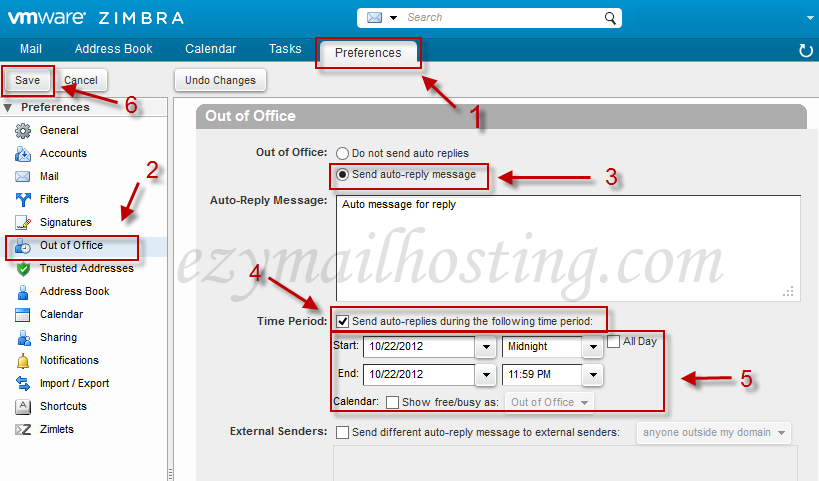
- Select Preferences.
- Select Out of Office in the menu on the left.
- Select “Send auto-reply message” and enter your reply in “Auto-Reply Message:”.
- To set the period when Out of Office operates, select “Send auto-replies during the following time period”.
- Enter the starting and ending dates and times. To mark yourself as unavailable on the calendar as well, select Show Free/busy as Out of Office.
- Save.