Monitor apache Virtualhosts real-time activity with apache-top
 Basic tools such as top for viewing load and Apache processes may be insufficient for managing a web server with virtual hosts. If Apache uses many resources, they do not show which virtual host consumes the most. Apache therefore provides status_module to monitor each virtual host and display its resource use on a web page. Administrators who find a web interface inconvenient can use apache-top.py to display the status in a console, with output similar to top.
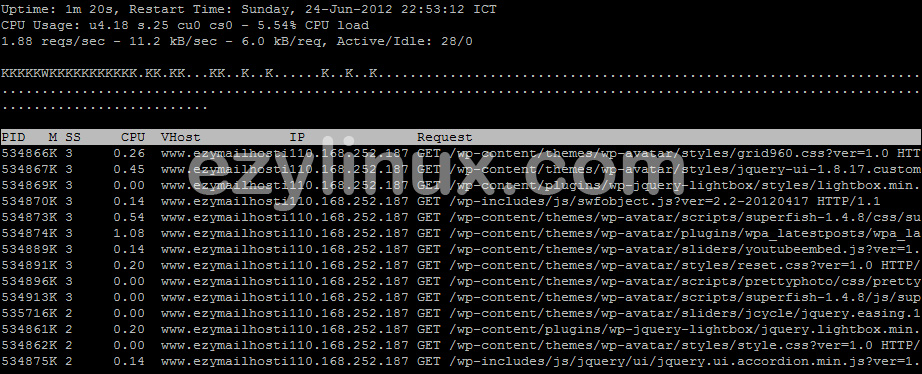
Apache-top.py is a Python script for monitoring /server-status through a top-like interface, letting administrators monitor without opening a browser. It displays the PID of each Apache process, its virtual host, and its request.
Installing status_module
Basic tools such as top for viewing load and Apache processes may be insufficient for managing a web server with virtual hosts. If Apache uses many resources, they do not show which virtual host consumes the most. Apache therefore provides status_module to monitor each virtual host and display its resource use on a web page. Administrators who find a web interface inconvenient can use apache-top.py to display the status in a console, with output similar to top.
Apache-top.py is a Python script for monitoring /server-status through a top-like interface, letting administrators monitor without opening a browser. It displays the PID of each Apache process, its virtual host, and its request.
Installing status_module
-
Edit /etc/http/conf/httpd.conf and check the following settings:
-
Enable the Status module.
LoadModule status_module modules/mod_status.so -
Set ExtendedStatus to On.
ExtendedStatus On -
Set the monitoring URL and access permissions.
<Location /server-status>
    SetHandler server-status
    Order deny,allow
    Deny from all
    Allow from 127.0.0.0/8
</Location>
-
-
Restart apache service
[root@ezylinux ~]# service httpd restart
Using Apache-top.py Download apache-top.py with:
[root@ezylinux ~]# wget http://www.fr3nd.net/stuff/projects/apache-top/apache-top.pyMonitoring command:
[root@ezylinux ~]# apache-top.py -u http://127.0.0.1/server-statusThe program displays output like the example below: