How to install SendmailAnalyzer on Zimbra mail
 SendmailAnalyzer เป็นโปรแกรมวิเคราะห์ log โปรแกรมหนึ่งที่ช่วยให้ผู้ดูแลระบบสามารถตรวจสอบภาพรวมการรับส่ง email ของระบบ mail ในรูปแบบกราฟและ report โดยสามารถแสดงผลได้ในรูปแบบ รายชั่วโมง รายวัน รายเดือน และรายปี นอกจากนี้ report ของ SendmailAnalyzer ยังสามารถใช้งานร่วมกับ SpamAssassin, MailScanner, Clamav, Amavis, RBL check, J-ChkMail และอื่นๆ
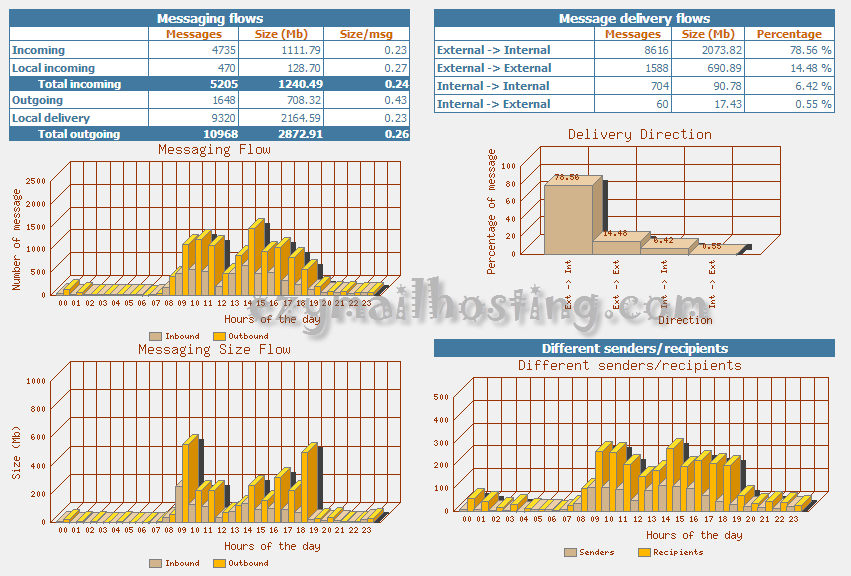
ตัวอย่าง report ของ SendmailAnalyzer
SendmailAnalyzer เป็นโปรแกรมวิเคราะห์ log โปรแกรมหนึ่งที่ช่วยให้ผู้ดูแลระบบสามารถตรวจสอบภาพรวมการรับส่ง email ของระบบ mail ในรูปแบบกราฟและ report โดยสามารถแสดงผลได้ในรูปแบบ รายชั่วโมง รายวัน รายเดือน และรายปี นอกจากนี้ report ของ SendmailAnalyzer ยังสามารถใช้งานร่วมกับ SpamAssassin, MailScanner, Clamav, Amavis, RBL check, J-ChkMail และอื่นๆ
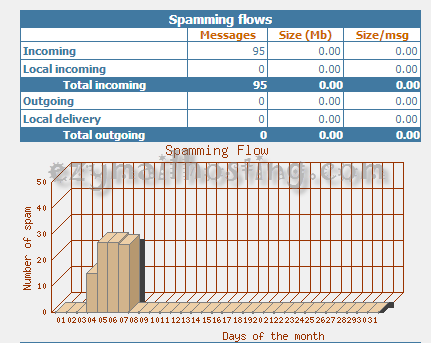
ตัวอย่าง report ของ SendmailAnalyzer
- ปริมาณการรับส่ง email รายชั่วโมง
- ปริมาณการรับส่ง email รายวัน
- ปริมาณการรับส่ง email รายเดือน
- ปริมาณการรับส่ง email รายปี
- สถานะการรับส่ง email แยกเป็น รายวัน เดือน และ ปี
- Top 25 Spammers Domain แยกเป็น รายวัน เดือน และ ปี
- Top 25 Spammers Address แยกเป็น รายวัน เดือน และ ปี
- Top 25 Emails Address และ server ที่มีการรับจดหมายสูงสุด แยกเป็น รายวัน เดือน และ ปี
- Top 25 Emails Address และ server ที่มีการส่งจดหมายสูงสุด แยกเป็น รายวัน เดือน และ ปี
การทำงานของ SendmailAnalyzer จะรวบรวมข้อมูลจาก log ตลอดเวลา ดังนั้นผู้ดูแลระบบสามารถตรวจสอบภาพรวมการรับส่ง email (inbound/outbound) ของ email, spam และ virus ได้อย่างรวดเร็ว การติดตั้ง SendmailAnalyzer เพื่อใช้งานร่วมกับ Zimbra Mail Server
-
ติดตั้ง perl module ต่างๆ เพื่อให้รองรับการทำงานร่วใกับ SendmailAnalyzer
[root@EZMAIL ~]# yum install perl-GD perl-GDGraph perl-GDGraph3d perl-GDTextUtil perl-GD -
Download SendmailAnalyzer จาก http://sourceforge.net/projects/sa-report/
-
เมื่อ download มาเรียบร้อยแล้ว ให้ทำการ extract file ด้วยคำสั่ง
[root@EZMAIL ~]# tar xvzf sendmailanalyzer-8.x.tar.gz -
เมื่อ extract file เรียบร้อยแล้วให้เข้าไปยัง sendmailanalyzer-8.x ด้วยคำสั่ง
[root@EZMAIL ~]# cd sendmailanalyzer-8.x -
ทำการ compile code เพื่อให้สามารถใช้งานร่วมกับระบบ
[root@EZMAIL sendmailanalyzer-8.x]# perl Makefile.PLผลลัพธ์
Checking if your kit is complete... Looks good Writing Makefile for sendmailanalyzer Done... Now type 'make && make install' -
จากนั้นให้รันคำสั่งติดตั้ง
[root@EZMAIL sendmailanalyzer-8.x]# make && make install -
รันคำสั่งด้านล่างเพื่อเริ่ม generate report
[root@EZMAIL sendmailanalyzer-8.x]# /usr/local/sendmailanalyzer/sendmailanalyzer -f -
ทำการตั้ง cron เพื่อให้ระบบทำการ caching ทุกๆ 5 นาที โดยรันคำสั่งด้านล่างเพื่อเพิ่ม cron เข้าไปยังระบบ
[root@EZMAIL ~]# crontab -eและให้เพิ่ม
*/5 * * * * /usr/local/sendmailanalyzer/sa_cache -a > /dev/null 2>&1 -
แก้ไข logrotate ให้ระบบสามารถทำงานได้หลังจากที่ได้มีการ rotate log file ไปแล้ว โดยการสร้างไฟล์ /etc/logrotate.d/maillog ด้วยคำสั่ง
[root@EZMAIL ~]# vi /etc/logrotate.d/maillogจากนั้นใส่ config ด้านล่างเข้าไป
/var/log/maillog { weekly rotate 20 compress delaycompress sharedscripts postrotate /bin/kill -HUP `cat /var/run/syslogd.pid 2>/dev/null` 2>/dev/null || true /usr/local/sendmailanalyzer restart >/dev/null 2>&1 || true endscript } -
ทำการเพิ่ม uri /sareport ให้กับ apache ด้วยการแก้ไขไฟล์ /etc/httpd/conf/httpd.conf และเพิ่มข้อความด้านล่างลงไปที่บรรทัดล่างสุด
Alias /sareport /usr/local/sendmailanalyzer/www <Directory /usr/local/sendmailanalyzer/www> Options ExecCGI AddHandler cgi-script .cgi DirectoryIndex sa_report.cgi </Directory> -
ทำการ restart apache service ด้วยคำสั่ง
[root@EZMAIL ~]# service httpd restart -
ตอนนี้ก็สามารถเข้าไปดู report ของ SendmailAnalyzer ได้แล้วที่
http://ip.address/sareport
ตัวอย่าง report ของ SendmailAnalyzer