How to share full account (all folders) to another user in Zimbra mail
 Zimbra รองรับการแชร์ข้อมูลแบบ full account หรือ all folder จาก user หนึ่งไปยังอีก user หนึ่งได้ โดย user ที่รับการแชร์สามารถอ่าน/แก้ไขข้อมูลของ account ที่แชร์ได้เหมือนเป็นข้อมูลของ user เอง
การตั้งค่าการแชร์ข้อมูลแบบ full account หรือ all folder จาก user หนึ่งไปยังอีก user หนึ่งสามารถทำได้เฉพาะบน command line เท่านั้น โดยคำสั่งที่ใช้สามารถรันคำสั่งได้ดังนี้
Zimbra รองรับการแชร์ข้อมูลแบบ full account หรือ all folder จาก user หนึ่งไปยังอีก user หนึ่งได้ โดย user ที่รับการแชร์สามารถอ่าน/แก้ไขข้อมูลของ account ที่แชร์ได้เหมือนเป็นข้อมูลของ user เอง
การตั้งค่าการแชร์ข้อมูลแบบ full account หรือ all folder จาก user หนึ่งไปยังอีก user หนึ่งสามารถทำได้เฉพาะบน command line เท่านั้น โดยคำสั่งที่ใช้สามารถรันคำสั่งได้ดังนี้
[zimbra@mail ~]$ zmmailbox -z -m [email protected] modifyFolderGrant / account [email protected] {permissions}โดยที่ permissions มี r (read) และ w (write) เท่านั้น ตัวอย่างการแชร์ข้อมูลแบบ full account หรือ all folder จาก user หนึ่งไปยังอีก user หนึ่ง สมมติต้องการแชร์ข้อมูลของ [email protected] ให้กับ [email protected] โดยที่ alice สามารถแก้ไขและอ่านข้อมูลได้ทั้งหมด ให้รันคำสั่งดังนี้
[zimbra@mail ~]$ zmmailbox -z -m [email protected] modifyFolderGrant / account [email protected] rwหลังจากรันคำสั่งด้านบน ขั้นต่อมาให้ทำการ mount ข้อมูลที่แชร์จาก [email protected] ทั้งหมดด้วยคำสั่ง
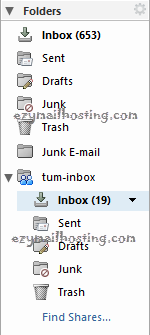
[zimbra@mail ~]$ zmmailbox -z -m [email protected] createMountpoint /tum-inbox [email protected] /เมื่อรันคำสั่งเรียบร้อยแล้วให้ตรวจสอบที่ mailbox ของ [email protected] จะพบ tum-inbox ปรากฏอยู่ ดังตัวอย่างด้านล่าง