How to share full account (all folders) to another user in Zimbra mail
 Zimbra supports sharing a full account, or all folders, from one user to another. The recipient can read and edit the shared account’s data as if it were their own.
Sharing a full account, or all folders, from one user to another can be configured only through the command line. Use the following command:
Zimbra supports sharing a full account, or all folders, from one user to another. The recipient can read and edit the shared account’s data as if it were their own.
Sharing a full account, or all folders, from one user to another can be configured only through the command line. Use the following command:
[zimbra@mail ~]$ zmmailbox -z -m [email protected] modifyFolderGrant / account [email protected] {permissions}The only permissions are r (read) and w (write). An example of sharing a full account, or all folders, from one user to another: Suppose you want to share the data of [email protected] with [email protected], allowing alice to read and edit all the data. Run:
[zimbra@mail ~]$ zmmailbox -z -m [email protected] modifyFolderGrant / account [email protected] rwAfter running the command above, mount all the data shared by [email protected] with:
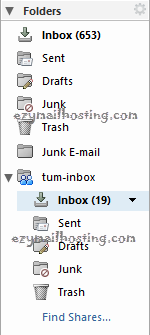
[zimbra@mail ~]$ zmmailbox -z -m [email protected] createMountpoint /tum-inbox [email protected] /After running the command, check the mailbox of [email protected]. You will see tum-inbox, as in the example below.