MS Cluster
MS Window 2000 Advance Edition supports only 2 nodes.
MS Window 2003 Standard Edition supports 4 nodes, if I remember correctly.
MS Window 2003 Enterprise Edition supports 8 nodes, if I remember correctly.
 Like Linux, Microsoft divides clusters into two types:
1. High Availability, also called Fail-Over. Put simply, when the first machine fails, the other machine works in its place. The software must support this operation, because the processes running on the first machine are moved to the second so they can continue running. Supporting software includes databases such as MSSQLServer 2000 and 2005 Enterprise, Oracle FailSafe, and DB2, and mail servers such as MSExchange 2000 and 2003 Enterprise.
2. Load balancing is mostly used in server farms, where machines help process the workload. It is commonly used for web servers and databases.
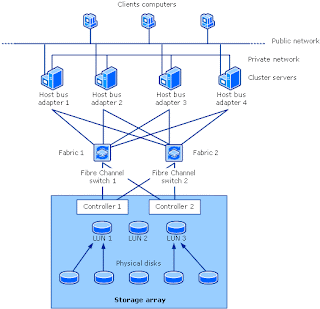
Client: The computer used by the end user.
Server: A machine used to build the cluster, running Window Server 2003.
Storage: Storage, as mentioned above. Here, Fibre connects storage to the servers. Fibre uses optical fiber; the current speed is 2 Gb/s and should reach 4 Gb/s by 2006.
Here are some terms:
Public Network: Simply the network used in the office.
Private Network: The internal network used only among the servers, also called the HeartBeat—sounds exciting!
Host bus adapter: A PCI card that converts optical signals to data. Think of it as similar to a LAN card.
Fibre Channel Switch: Similar to a LAN switch, but incredibly expensive!
Controller: Controls storage operation. A storage unit has two controllers, depending on the model. A unit with two controllers costs a few hundred thousand—not expensive, right?
LUN: I cannot remember what the acronym stands for, but it means space allocated by the controller from hard disks that have already been configured as RAID. (If you have forgotten RAID, look it up yourself; I am feeling lazy.)
SAN: An extra term: Storage Area Network, a network for storage devices.
MSCS builds a cluster using Active Directory, which is a key part of Microsoft Server. Therefore, before setting up MSCS, you need Active
Directory. MSCS then creates a Virtual Server.
This Virtual Server has an IP address and computer name like an ordinary machine, and you can ping its assigned IP address. In this case, the Virtual Server connects to clients, which point their connection paths to it.
The main components of MSCS are:
Like Linux, Microsoft divides clusters into two types:
1. High Availability, also called Fail-Over. Put simply, when the first machine fails, the other machine works in its place. The software must support this operation, because the processes running on the first machine are moved to the second so they can continue running. Supporting software includes databases such as MSSQLServer 2000 and 2005 Enterprise, Oracle FailSafe, and DB2, and mail servers such as MSExchange 2000 and 2003 Enterprise.
2. Load balancing is mostly used in server farms, where machines help process the workload. It is commonly used for web servers and databases.
Client: The computer used by the end user.
Server: A machine used to build the cluster, running Window Server 2003.
Storage: Storage, as mentioned above. Here, Fibre connects storage to the servers. Fibre uses optical fiber; the current speed is 2 Gb/s and should reach 4 Gb/s by 2006.
Here are some terms:
Public Network: Simply the network used in the office.
Private Network: The internal network used only among the servers, also called the HeartBeat—sounds exciting!
Host bus adapter: A PCI card that converts optical signals to data. Think of it as similar to a LAN card.
Fibre Channel Switch: Similar to a LAN switch, but incredibly expensive!
Controller: Controls storage operation. A storage unit has two controllers, depending on the model. A unit with two controllers costs a few hundred thousand—not expensive, right?
LUN: I cannot remember what the acronym stands for, but it means space allocated by the controller from hard disks that have already been configured as RAID. (If you have forgotten RAID, look it up yourself; I am feeling lazy.)
SAN: An extra term: Storage Area Network, a network for storage devices.
MSCS builds a cluster using Active Directory, which is a key part of Microsoft Server. Therefore, before setting up MSCS, you need Active
Directory. MSCS then creates a Virtual Server.
This Virtual Server has an IP address and computer name like an ordinary machine, and you can ping its assigned IP address. In this case, the Virtual Server connects to clients, which point their connection paths to it.
The main components of MSCS are:
- HeartBeat lets the cluster check which machines are alive or down.
- Qumrum Disk stores cluster processes so the machine taking over can continue using them.
- Cluster Service—how could you have a cluster without it? Credit: toon of promsook.com